Last Thursday evening (August 1, 2024) I experienced major problems with my outgoing network connections. The weird part was that the connection problems were mostly IPv4 related. I had on and off connections to sites or ips that use pure IPv4 addresses and experienced basically no problems with sites that also have IPv6 addresses as newer Linux distros use IPv6 by default. This means I could connect to Google Search Engine smoothly.
Further tests revealed I could connect to the IPv4 network gateway successfully, but anything beyond that was also on an on-and-off basis. So finally I contacted Hinet for tech support and they would send a technician Friday morning to address the issue.
When the technician arrived on Friday morning he also brought a new GPON modem with him. My old modem is an Alcatel model and had been in use for about 10 years and should be replaced anyway. After the new model was configured properly, the IPv4 issue was also solved. The technician also told me when he inspected the old modem he found there was some problem with the IPv4 part.
Things should have been OK from then on. Yet as I can also access the new modem (a Nokia model), I accessed it on Saturday night to see some of its settings. When I was on its Mac Filter page, I checked the Enable part as shown below:
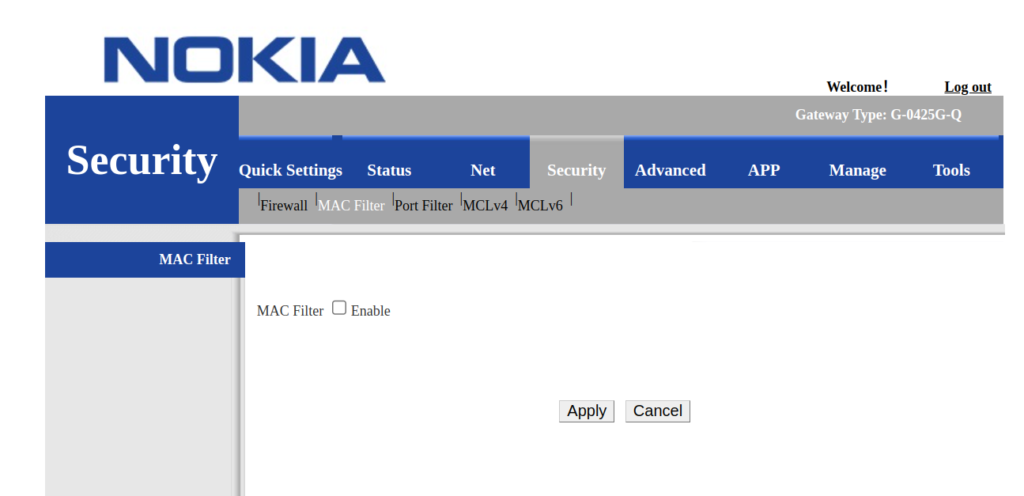
You can see there are also Apply and Cancel buttons. This normally means any changes you have made should be effective only after you have clicked Apply.
After Enable is checked, the following appears
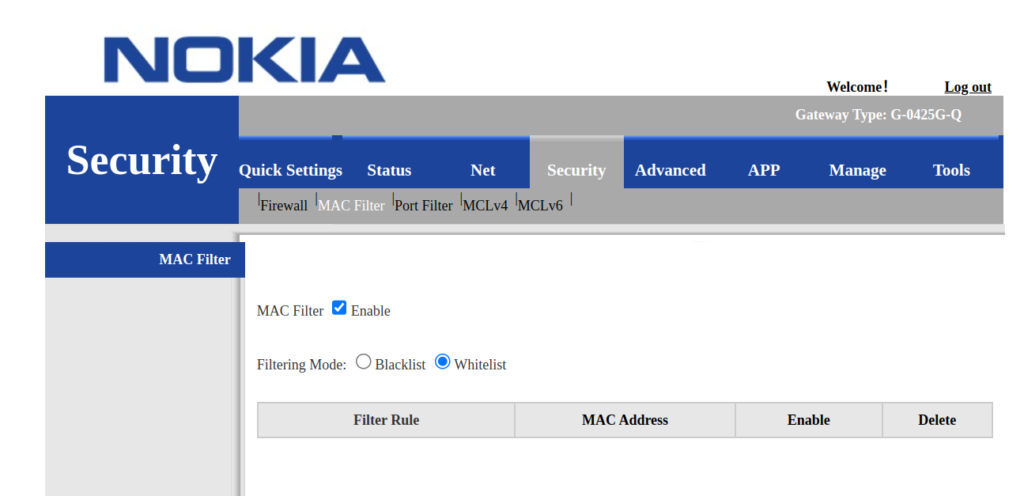
The default value for Filtering Mode is Whitelist.
As I didn’t add any MAC addresses I just clicked on other tabs to see more. Then no long after that I started to experience problems with IPv4 connections again. This time I even could not reach the IPv4 gateway. After many tests, I called Hinet again and as it was Saturday, they could only send a technician Monday morning.
After the call I pondered for a while and accessed the Nokia GPON ONT modem again and found the the status for Enable on the Mac Filter page was still set to checked. Not until then did I realize that it was the culprit and after unchecking Enable, all my external IPv4 connections went back to normal.
That Nokia modem’s UI behavior is really strange and counter-intuitive as it does not follow general practices.

Pingback:New Network problem – Tim's Random Babblings
Hello.
Good cheer to all on this beautiful day!!!!!
Good luck 🙂
Deeply appreciate it!
Grateful for your help!
Hello everyone!
I was recently searching for reliable resources on bolstering my cybersecurity posture. It’s becoming increasingly difficult, particularly when it comes to ethical hacking strategies. I stumbled upon a really helpful resource that I believe could benefit many of you. It’s full of in-depth articles on various security topics. You should definitely take a look https://blog.pentestnepal.tech/ if you’re interested in your understanding of cyber threats.
I was particularly impressed by the practicality of the content. You can find discussions on fundamental concepts to more advanced techniques, making it suitable for both beginners and experienced professionals. Whether you’re looking to understand new vulnerabilities or refine your security processes, you’ll find valuable insights here. Each post provides practical tips and solid information, which is invaluable in today’s dynamic cybersecurity world. It’s a true hidden gem for security enthusiasts.
New articles are posted often, so you’re always getting the latest information and trends. My knowledge has significantly grown thanks to their articles and I’m sure you’ll find it beneficial as well. It’s a great addition to my go-to resources for staying informed and sharp in the world of cybersecurity. Check it out and share your thoughts with me!